
A known video rarely comes back as the same file. By the time it resurfaces, it has often been re-encoded, cropped, trimmed, reposted in vertical format or buried inside a compilation 40 minutes or so long. Each edit makes a new file, and a hash list sees a stranger every time.
Video fingerprinting looks at the content instead of the file, so it can recognise footage even after it has been edited. Below, we explain how it works, where different hashes fall short, and how to choose a solution for content protection, moderation and media tracking.
What is video fingerprinting and how does it work?
Video fingerprinting is a form of digital fingerprinting that identifies known footage by what it shows, not by the file it's in. It extracts distinctive visual features from video, stores them as searchable fingerprints, and compares new material against that reference collection.
A video can be thousands of images: 90 seconds at 30 frames per second is 2,700 frames. Fingerprinting turns those frames into compact signatures that can still match after the footage has been edited.
A typical workflow has four stages:
Register reference content. Add the originals you want to find to a reference index. Each gets its own ID, so a match tells you which video was found.
Extract visual fingerprints. Process frames and scenes into representations of their distinctive visual features.
Don't miss our insights
Subscribe to our newsletter for monthly updates on visual identification technology and industry developments.
By subscribing, you agree to receive our monthly newsletter. You can unsubscribe at any time. See our Privacy Policy for details on how we handle your data.
Match incoming material. Compare new uploads, files or streams against the reference index, including partial matches.
Route the result. Send the matched asset and its timestamps to a review, reporting or enforcement workflow.
Video recognition: identification vs. classification
Video fingerprinting is a form of video recognition, but it isn't classification. A classifier can tell you a clip shows a football match. An identification engine tells you it contains this specific registered broadcast, and where: from 12:30 to 14:00. For moderation, media tracking and deduplication, that is the answer that matters.
The two approaches answer different questions:
Classification (AI)
Question it answers: What kind of content is this?
Works on: New, never-seen content
Result: A label and a confidence score
Typical use: Flagging new material for human review
Identification (fingerprinting)
Question it answers: Is this a known video, and where does it appear?
Works on: Content already in your reference index
Result: The matched asset and its timestamps
Typical use: Catching re-uploads, copies and excerpts of known material
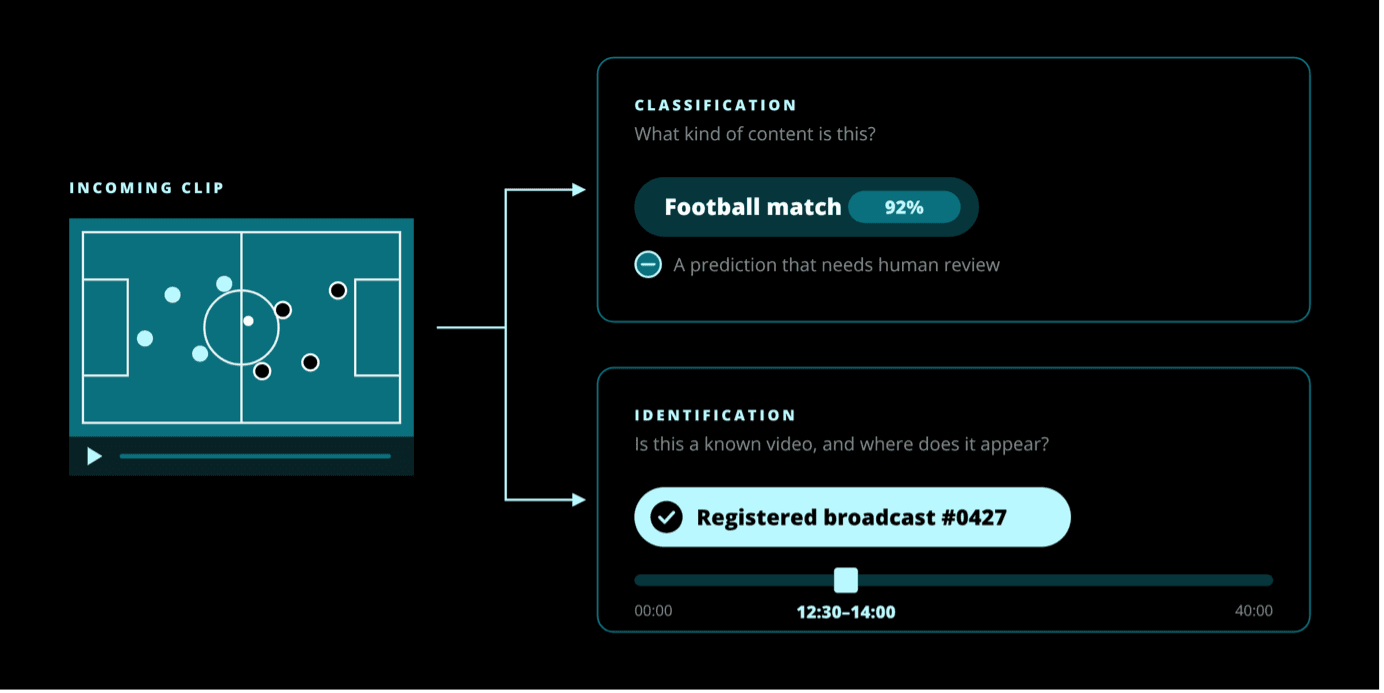
Neither replaces the other. A classifier can surface new harmful or infringing material that no index holds yet, but its output is a prediction that needs review. A fingerprint match points to a specific known video, so a reviewer can compare the two directly.
The two also work together. Once a reviewer confirms a classifier's find, its fingerprint can go into the reference index. From then on, every re-upload, re-encode or excerpt of it is caught as a known match, without being classified from scratch.
Why some hashes miss modified video
Most video hashes are image hashes applied to video.
vPDQ runs Meta’s PDQ image hash on frames sampled through the video. PhotoDNA for Video does the same with PhotoDNA on key frames. Generic perceptual hashes like pHash have been adapted the same way. This lets them find a known clip inside a longer video. But each frame is still compared as a whole image, so a video hash is only as robust as the image hash it’s built on. If a crop, border, overlay or vertical reformat breaks the match for an image, it breaks the match for every frame of the video too.
Cryptographic hashes such as MD5 are stricter still: any change to the file, even a re-encode, produces a new hash.
How Visual Fingerprints work differently
Videntifier’s Visual Fingerprints work differently. Instead of one signature per frame, they match many small regions inside each frame, so a clip can still be found when part of the picture has changed.
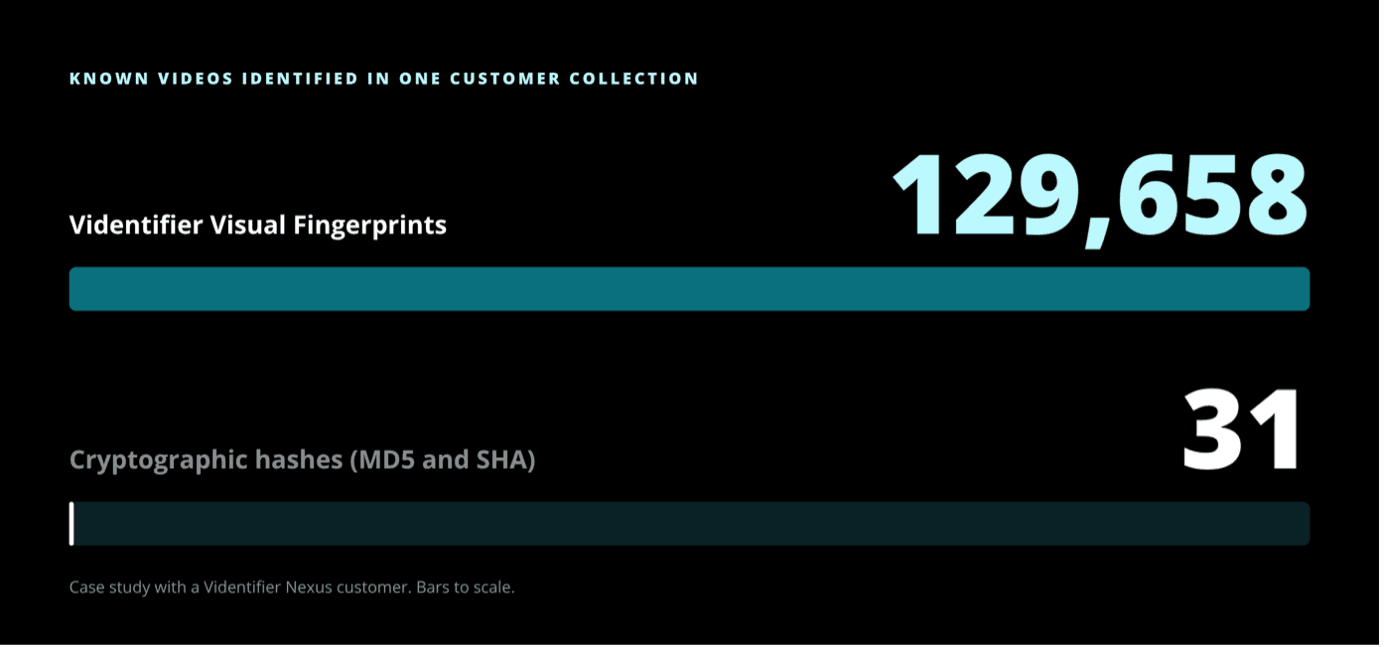
The difference shows up in real collections. In a case study with a Videntifier Nexus customer, our Visual Fingerprints identified 129,658 known videos. Cryptographic hashes (MD5 and SHA) found 31.
YouTube Content ID: how it works, and where it stops
YouTube Content ID is the best-known example of fingerprinting at scale. It scans uploads against a database of audio and visual files submitted by copyright owners. When it finds a match, the owner's settings decide what happens: block the video, monetize it, or track its viewership (YouTube Help).
Content ID only works on YouTube, and only for owners with exclusive rights to a substantial body of original material that is frequently uploaded there. Your content can still turn up on other platforms, in private channels or in archives where Content ID never looks.
Outside YouTube, you need your own index. With Videntifier, you register your reference library and match it against any source you feed it: platform uploads, archives or live broadcast streams. A fingerprint index identifies what you give it. It doesn't crawl the internet by itself.
Audio fingerprinting vs.video fingerprinting
Audio fingerprinting identifies a soundtrack. Video fingerprinting identifies the footage itself.
- Audio fingerprinting is efficient and robust for music and broadcasts, even when the picture changes. It fails when the audio is muted, replaced or buried under new music.
- Video fingerprinting works on the picture, so it still matches when the audio has been stripped or swapped.
Ask whether your workflow needs to identify the soundtrack, the footage or both. Videntifier focuses on visual identification of video and images.
Video fingerprinting use cases: content protection, moderation and media tracking
Every use case starts the same way: match new video to content you already know. Only the next step changes.
- Online service providers. Filter out known illegal content on upload, even after re-encoding, cropping or compilation. Keep reported content from coming back as a re-upload, and help safeguard vulnerable user groups. Manage copyrighted material on the platform.
- Entertainment industry and copyright owners. Know when and where your content is used, including copied and embedded excerpts, with timestamped evidence a reviewer can check. Then decide what happens: take it down, monetize it or allow distribution. Fingerprints identify the content itself, which strengthens DRM beyond watermarks that can be cropped or blurred out.
- Law enforcement. Manage known media databases, automatically analyse seized data, and safely share known-media information as fingerprints rather than the media itself. Collate and link data across investigations. Agencies already use Videntifier Nexus to speed up CSAM investigations.
- Broadcasting and news. Maintain trusted master content and check any news footage against it. Collect and share known fakes so they're caught when they resurface. Monitor broadcast and streaming output for registered content.
- Brands and advertisers. Track where paid advertising actually runs, see how campaign videos are shared, manage all visual assets in one index, and report on campaign impact.
- Archive management and video analysis. Separate exact duplicates from edited versions across large libraries of images, video files and broadcast streams.
How to evaluate a video fingerprinting solution
The best test of any video analysis or fingerprinting solution is your own content. Register a set of originals, make the edits you actually see, and check whether the right source comes back with the right timestamps. Include unrelated clips and look-alike scenes too, not just expected matches.
What to measure:
- Detection quality: missed matches and false matches, recorded separately.
- Editing resilience: cropping, borders, overlays, re-encoding, vertical reformatting, short excerpts and compilations, each tested on its own.
- Short-clip and single-frame matching: can it find a known video from a few seconds or one frame?
- Performance: extraction, indexing and query time, plus reviewer effort per match.
- Deployment fit: hosting, what data leaves your systems, and how updates and support work.
On deployment, Videntifier's extraction runs on your side and transmits only fingerprint data, never raw content. Matching can also run on premises, including air-gapped. Fingerprints are still derived data, so review access, retention and auditability.
Frequently asked questions
What is video fingerprinting?
Video fingerprinting identifies known video by its visual content rather than its file. It extracts distinctive features from frames and matches them against a reference library, so edited copies are still recognised.
How does YouTube Content ID work?
Content ID compares every YouTube upload with audio and visual files submitted by eligible copyright owners. On a match, the owner's policy blocks, monetizes or tracks the video. It only covers YouTube.
Is video fingerprinting the same as hashing?
Not quite, though the terms are often used loosely. A cryptographic hash such as MD5 matches only identical files. Perceptual hashes tolerate some changes. Fingerprints built from local features are designed to match content that has been cropped, reformatted or cut into other footage.
Can video fingerprinting find a short clip inside a longer video?
Yes, if it matches local features rather than one signature per video. Videntifier can identify short clips from longer videos, often from a single frame, and returns the timestamps of the match.
Schedule a call and test Visual Fingerprints on your own footage: https://videntifier.com/contact?product=identification-engine&inquiry=demo#book